
A cutting line can be advertised as automatic while the buyer still has to decide which raw bar is next, separate the selected profile from its neighbors, and identify the parts that leave the saw. For a JR-650CNC auto-loading line inquiry, the useful test is not a photograph of a rack beside a saw. It is a witnessed route from a named stock location to one correctly identified cut order, including the handoffs when the stock family changes or a feed attempt is interrupted.
Jiurun’s brochure shows a JR-650CNC automatic loading and cutting line with layered independent storage, parallel stock presentation, servo positioning, and production-count reporting. Treat that as a catalogue concept, not a promise that every quoted line contains the same rack, separator, controller, interface or tracking function. Ask for the exact release and a line drawing. This guide focuses on stock selection and single-profile feed acceptance. For the separate investment decision about connecting a warehouse to a saw, see the automated bar-storage comparison.
1. Map the JR-650CNC auto-loading line stock-to-saw boundary
Begin with the material your factory will present: profile drawing and revision, alloy or temper if relevant, bar length range, section envelope, mass, surface protection, bundle form and permitted contact faces. Mark whether the supplier receives individual bars, bundles or a loaded rack. A quoted automatic loader may start at its own magazine; forklift delivery, bundle opening, batch labeling and warehouse retrieval may remain buyer tasks. Put the ownership of each physical handoff on the line layout before comparing quotations.
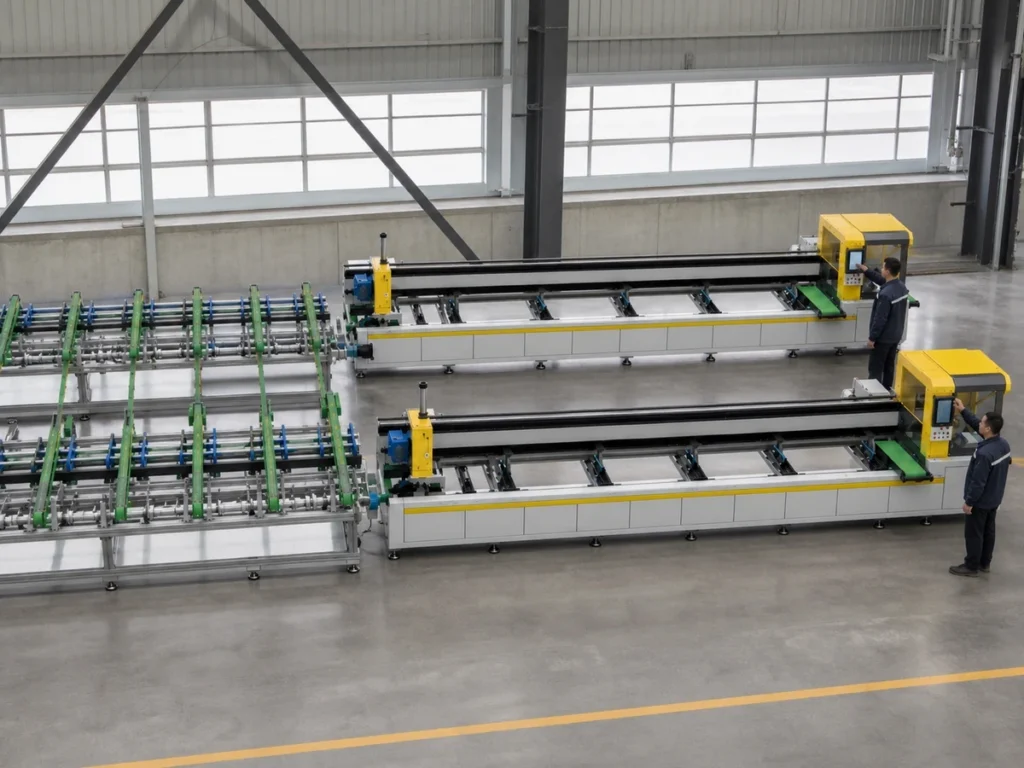
Show every proposed storage level and lane, the point where one profile is selected, the transfer path to the feed rollers, the saw entrance, accepted-part collection, offcut/remnant destination and reject or held-part position. Ask what a technician can see from the normal control position. If the offer includes a counting or reporting screen, state which events create a count and who reconciles it with accepted parts. A count of saw cycles is not automatically a count of released components.

2. Define the selection record before discussing automation speed
For each trial order, give the supplier a stock ID, lot or heat reference if your process uses one, profile section and orientation, bar length, drawing revision, required cut length, required quantity, and the intended destination for finished parts and remnant. Tell them which identity travels on a physical tag, which is displayed in a control screen, and which is recorded only in your production system. The seller should mark interfaces that are included in the quote and any manual transcription. Do not assume a barcode reader, network connection or recipe download merely because the line is described as automatic.
Ask the supplier to demonstrate how a released order selects the correct lane or level and how an operator confirms the stock before the first cut. A selection result should be observable without guessing from the machine motion. Record what prevents an unselected neighboring profile from entering the transfer path, and what the operator sees when the expected stock is missing or a different section is staged. These are acceptance questions, not claims that a particular interlock already exists.
3. Use an A–B–A trial to expose changeover errors
One straight, clean bar may make almost any feed route look convincing. Choose at least two production families that differ in a way the loader must recognize: section width or height, protected face, length, support need or lane position. Run Family A, change to B, then return to A. Preserve the original A order and record whether the right stock, orientation, cut program and part destination are restored without rewriting values from memory. If a profile requires a special carrier, separator or clamp, include it in the quoted configuration and record the change time separately from cutting time.
Write the trial matrix before the demonstration. Each row needs the released drawing, actual stock identification, selected storage location, requested output, allowed setup actions, acceptance measurements, observers and a space for deviations. Run several consecutive selection-and-feed events, including the first bar after changeover and the last usable bar in a lane. Record double-presentation, skewing, surface contact and partial-transfer events as observations even when the saw ultimately produces a usable piece. A good final part alone does not prove that every upstream handoff was controlled.
For the finished component, define the length datum and end-face condition on the buyer drawing. The loader’s feed positioning is only one contributor. Clamping, blade condition, stock straightness, extrusion variation, cut forces and measurement method can change the result. Do not convert any catalogue positioning number into a finished-part tolerance. If the purchaser needs a capability statement, agree the profile, sample size, gauge, datum, acceptance limit and witness before cutting.
For a separate reference on what an axis-positioning test measures, see ISO 230-2:2014. The buyer still needs a finished-part inspection plan for its own profile and datum.
4. Test single-profile transfer and recovery as separate events
At the selection point, ask the supplier to show how one profile is presented to the feed path and how the next profile is held. The test should include representative section shapes rather than one easy rectangular bar. Define where a skewed bar, short remnant or contact with a neighboring bar will be detected or visibly stopped. Do not prescribe a specific sensor or mechanism in the RFQ unless your process requires one; request the proposed design and the evidence that it handles your stock family.
Include an interrupted transfer in the witnessed plan. The responsible technician should explain the safe, documented recovery path and the record that preserves order and stock identity. The buyer should verify whether the machine resumes the same bar, discards it, or requires manual re-identification. Put any scrap or hold decision in the trial record. This is a procurement acceptance test; detailed operating and safety procedures must come from the actual machine documentation and trained personnel.
5. Reconcile bar, part and remnant counts
Agree categories before reading the production report: accepted component, sample, setup piece, held part, scrap, reusable remnant and uncut returned bar. Follow one named raw bar through the trial and record its identity at the saw entrance and after the final cut. The line might report selected bars, feed events or cutting cycles; ask which values are measured, entered manually or calculated. Keep the accepted-part count with the buyer’s inspection record so a later rejection cannot silently remain in the production total.
If several bars sit in parallel lanes, ask how the report distinguishes a lane, order and batch, and what happens when a lane is replenished during a run. If traceability is a purchasing requirement, include the required fields and export format in the quotation. If it is not needed, do not pay for an untested data interface because an attractive dashboard appears in a demonstration. The useful output is a reliable reconciliation at the boundary your factory actually owns.
6. Compare complete line scope, not isolated machine ratings
A line quotation should itemize storage levels and usable lane sizes, transfer and separation devices, supports, feed and saw arrangement, guards and access, controls, included software functions, part and remnant handling, extraction and utility requirements, installation footprint, commissioning, training, documentation and service scope. Mark optional equipment and buyer-supplied items. Ask whether the quoted line is a standard release, a configured variant or an engineered integration. A photograph may show adjacent modules that are not included in the price.
Require a version-specific layout with bar-flow arrows, access space, interfaces and a responsibility table. Ask the supplier to state the tested stock envelope and any sections requiring a fixture or different contact material. Separate a machine cycle-time figure from the time to load, select, change family, inspect, unload and reconcile the order. Compare complete accepted output under your mix, not the fastest isolated cut on a convenient bar.
Related JiurunMachinery video below shows a general automatic aluminum saw and an infeed area. It is from the company channel, but it does not show or verify this quoted JR-650CNC loading-line configuration, independent storage lanes, single-bar selection, the buyer’s material, a witnessed trial, accepted-part counts or performance.
7. Make the acceptance route a quotation attachment
Attach the line layout, A–B–A trial matrix and a sample bar-to-part reconciliation form to the inquiry. Ask the supplier to identify what it will demonstrate at the factory, what must be checked after installation, and what data or stock the buyer must provide. State the inspection gauges, sample quantity and permitted adjustment or retest route. A failed selection, unexplained count or uncontrolled changeover should have a recorded disposition before acceptance; it should not be explained away by a separate clean demonstration.
The buying decision is whether this specific quoted line handles your released stock families and order mix through a controlled, observable route. Send JiurunCut the profile drawings, stock packaging, production mix, required identification fields and site layout through the engineering contact page. Request a version-specific line diagram and witnessed trial plan. The supplier’s reply should make the equipment boundary, unproven assumptions and acceptance evidence explicit before an order is placed.